
Do you want to know how to round numbers? Follow me.
Let’s assume I get paid for correcting text and I don’t want to work with tiny amounts, like individual cents. What may help me is rounding the number of characters checked by me in a given text. When I round it, my income will be rounded as well. Let’s assume that I want to round to the nearest multiple of 200. In standard Excel rounding, when we go to the middle of the number, which in our case is 100, the rounding starts to go up. It means that when we use, e.g. the MROUND function to round the nearest multiple of 200, in the case of 2349 we go up because we passed the threshold of 2300. However, in the case of 2499, we go down. Why? Because we haven’t reached the middle point. But when we reach the middle point, which in this example is exactly 2500, we go up. In order to go up, we only have to reach the middle point, and when we don’t reach this point we go down. It means that it’s even for me and for my customer (Fig. 1)
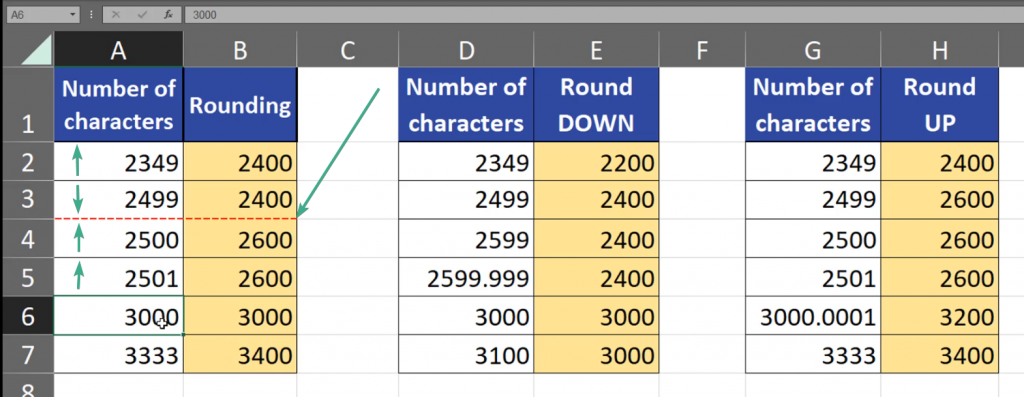
Sometimes, there are situations that I always want to round down or always round up. Let’s assume that rounding down will be a little bit nicer to my customer, and rounding up will be nicer for me. How can we do it? In Excel, when we always want to round down, we can use the FLOOR function (Fig. 2)
=FLOOR(D2,200)

We have to remember that we are still using the rounding to the nearest multiple of 200. Our rounding goes down even if we passed the halfway. Even, when we are very near and almost reached the point of the multiple, and even if the difference is a very small fraction of an integer, like in 2599.999, we still go down. And when we reach the nearest multiple, which is 3000 in our case, it becomes our base and we will still go to this base until we reach the next base, which is the next multiple of 200 (Fig. 3)

When we want to always go up, we can use the CEILING function, where we also give it a number and significance, i.e. a multiple, as it was with the FLOOR function (Fig. 4)
=CEILING(G2,200)

When we pass our next multiple, we always go up. Even if the number passed the nearest multiple by only a small fraction, like 30000.0001, we still go up (Fig. 5)

Of course, 200 is only an example of a multiple for those functions. We can write there 500, or use even decimal numbers, like 0.5 or 1.5. However, the example above used simple, hole numbers.